Settings window
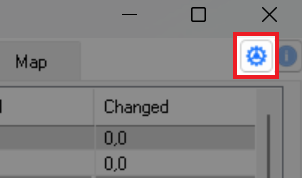
Stealth settings window is opened by pressing the gear icon in the upper right corner of the main Stealth window:
Items:
-
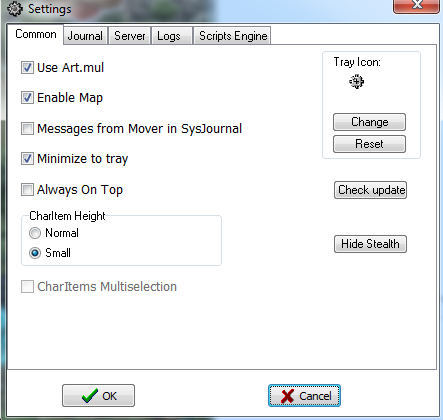
Use Art.mul - to display images of objects on the World tab
-
Enable Map - Enable Map drawing (Map tab)
-
Messages from Mover in SysJournal - display messages from scripting movement functions of the character
-
Minimize to tray - Enables hiding app from Taskbar, app can be opened by tray icon click
-
Always On Top - Keep Stealth window above all other windows
-
CharItems Multiselection - allow selecting several Char items in CharsList at once
-
Detect hung network connection - watch the connection to the shard and drop it if it hangs (1 minute timeout)
-
CharItem Height group - you can select height of Char items in CharsList (left side of Stealth window) - Normal or Small
-
Tray Icon group - You can change Stealth default tray icon to another (Change) or return the default one (Reset)
-
Check update button - Manual update check (by default it checking once per day when Stealth launching)
-
Hide Stealth - hide the Stealth window completely (shown again by pressing the key combination Ctrl + Alt + Shift + S)

Items:
- Show Cliloc text in journal - display text from a file cliloc. If disabled - messages will be shown in format “cliloc# XXXXXXXX, where XXXXXXXX - Cliloc ID
- Colors in journal - If enabled - incoming colored lines from server will be painted with color.
- Save journal background color - if enabled, then once default background color changed - this changes will be saved.
- Show in Journal: group - select additional items, which will be printed to journal: Extended Chat messages, ContextMenu items, Multis Info (Houses, boats, etc.)
The virtual Stealth server settings. This server allows you to connect with UO graphic client (original 2D client, Orion, ClassicUO, TazUO) to the Stealth and play the character Stealth is connected with.
Items:
-
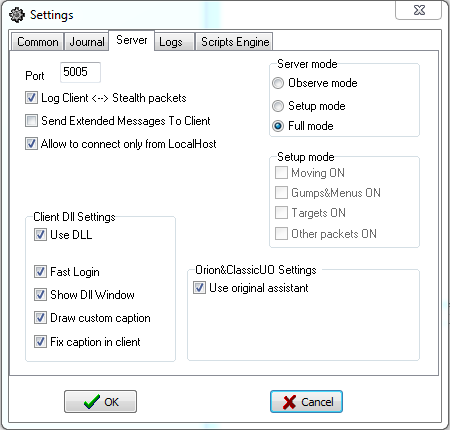
LoginServer Port - port of the Stealth login server. A client started from Stealth connects to it automatically; you can also start the client yourself and point it to
127.0.0.1and this port. -
Log Client <–> Stealth packets - write all client-Stealth traffic to the packets log (see the Logs tab: log path and packet filter).
-
Send Extended Messages To Client - show in the client messages like “Target\Menu\Gump reply sent from stealth”, when a script answers a target, menu, gump, etc.
-
Allow to connect only from LocalHost - accept client connections only from your own PC. Login and password are not checked in this case. If disabled, clients from other PCs may connect, and more fields appear:
- Login - fixed,
StealthClient; it can not be changed. - Password - password the remote client must enter.
- LoginServ fixed IP - IP address sent to the remote client for the game connection. Set your external (white) IP here, if the client connects through the Internet.
0.0.0.0- use the address the client connected to.
- Login - fixed,
-
Server mode group:
- Setup mode - the client receives only what is enabled in the Setup mode group below:
- Moving ON - allow movement from the client
- Gumps&Menus ON - send gumps and menus to the client
- Targets ON - send targets to the client
- Full mode - the client receives everything (targets, menus, gumps) coming to Stealth from the game server.
- Setup mode - the client receives only what is enabled in the Setup mode group below:
-
Atom Settings group - Atom is the Stealth plugin, loaded into the client started from Stealth (into the original 2D client, Orion, ClassicUO or TazUO).
- Use Atom - load Atom into the client. The rest of the group is available only when it is on.
- Fast Login - log in automatically, skipping the login, shard and character selection screens.
- Show Atom Window - show the Atom window.
- Draw custom caption - draw custom text and icons in the client caption. If the caption text becomes broken all the time - switch it off.
- Fix caption in client - fix invalid shard&char names in the client caption (2D client only). Usually on.
-
Orion&ClassicUO Settings group - affects only Orion, ClassicUO and TazUO started from Stealth.
- Use original assistant - load the client’s own assistant together with Atom. For Orion it is OrionAssistant; for ClassicUO/TazUO it is the plugin selected with the Browse button (e.g. Razor or ClassicAssist).
- Browse - select the assistant plugin file (.exe/.dll) for ClassicUO/TazUO. The status line under the checkbox checks the selected file: OK (.NET assistant), OK (native plugin, x64/x86), or what is wrong (path not set, file not found, it is a folder, it is the UO client itself, not a plugin).
- Fast Login - automatic login when Atom is not used (available only when Use Atom is off; with Atom the Fast Login from the Atom group works).
- Enable packetlogger - enable the client’s own packet logger.
Items:
-
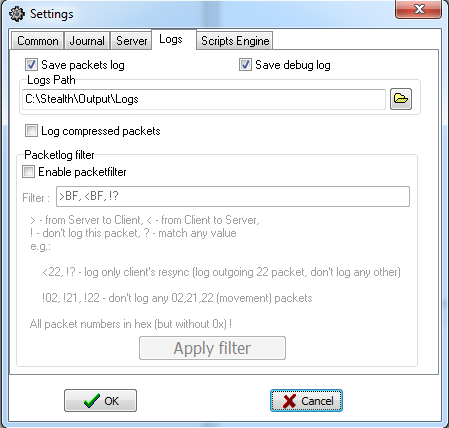
Save packets log - write Stealth-server network packets to a file with file %profilename%_packets.log in logs folder.
-
Save debug log - write to a file all debug information
-
Logs Path - press the button to select logs folder (or enter it by keyboard)
-
Log raw packets - include in packet logs raw (compressed) packets. Should be enabled in debug purposes only.
-
Packetlog filter group - packets filter list, for ignore selected packets. Switched on by Enable packetfilter. After modify - press Apply filter!
>- from server to client,<- from client to server,!- don’t log this packet,?- match any value- all packet numbers are in hex, without
0xor$ - e.g.
<22, !?- log only client’s resync (log outgoing 22 packet, don’t log any other);!02, !21, !22- don’t log any 02, 21, 22 (movement) packets
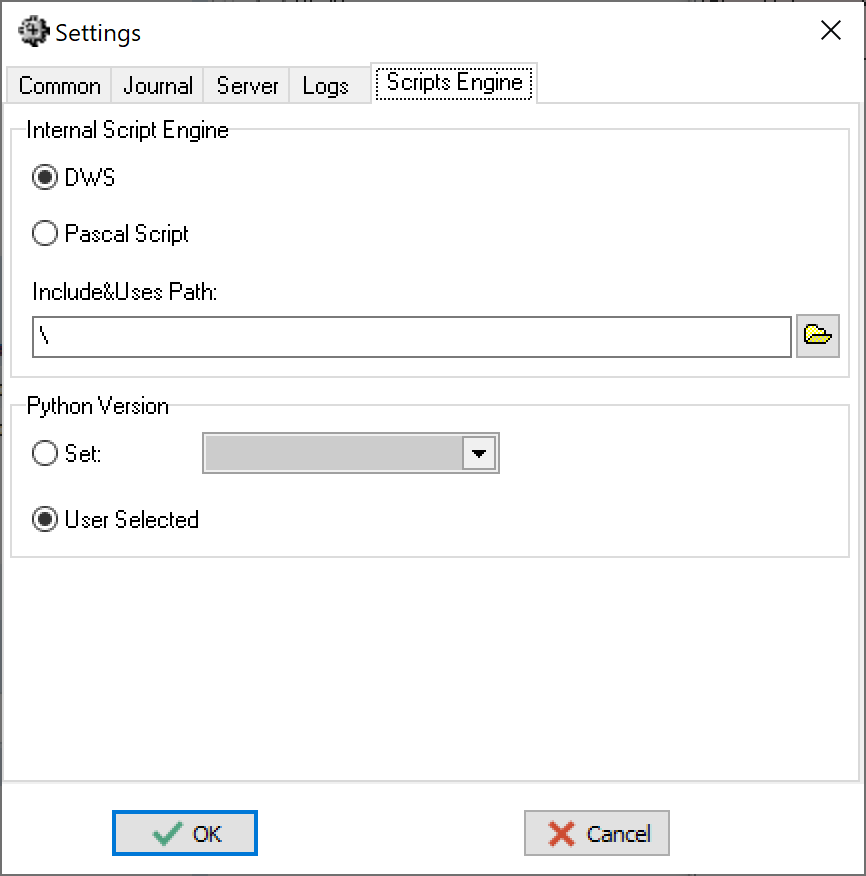
Items:
- Internal Script Engine (Pascal) group - engine for Pascal scripts:
- DWS - Modern and powerful Pascal script engine, recommended.
- Pascal Script - Old Pascal script engine, limited by abilities, supported no longer. Not recommended.
- Include&Uses Path - Folder, contains units&includes for DWS&PS (if differ from default folders)
- Python Version group - Python interpreter selection from all versions, installed on computer:
- Set - always use the version selected in the list.
- User Selected - Stealth asks which Python to use when a py script is started.
- Unpause delay for scripts (in seconds) - works with the Pause scripts on disconnect option of the character (checkbox in the main window, or SetPauseScriptOnDisconnectStatus from a script). After reconnect, paused scripts are resumed not at once, but after this delay - to let the character finish loading (world, backpack, etc.).
0- resume at once. If the character disconnects again before the delay ends, the scripts stay paused.
The script editor can pass your prompt to an AI CLI agent you already use (Claude Code, Codex CLI, Gemini CLI, a local model in ollama) and paste the answer back through a preview. Stealth is not an AI provider: it keeps no keys and no tokens, and the agent handles its own login. Full description - the AI assistant manual.
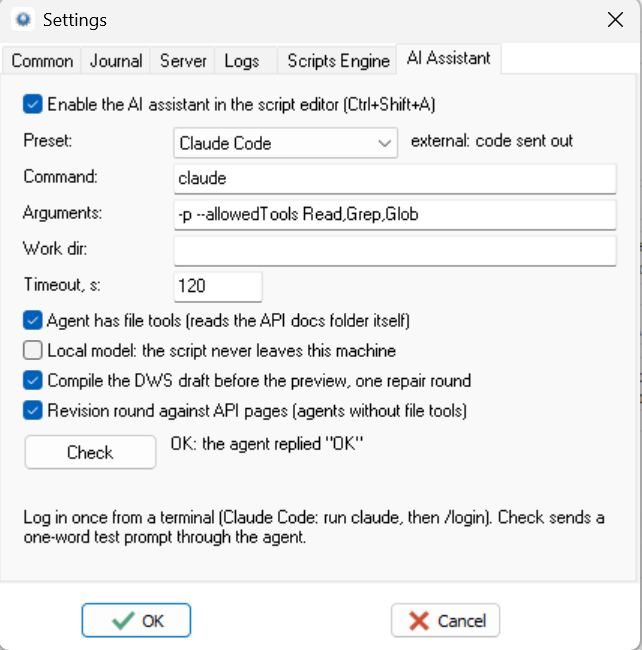
Items:
- Enable the AI assistant in the script editor (Ctrl+Shift+A) - master switch, off by default. Enabling it for an external provider shows a one-time privacy warning naming what is sent.
- Preset - a named set of the fields below (Claude Code, Codex CLI, Gemini CLI, ollama, plus your own from
[AI.Preset.<Name>]sections of Stealth.ini). (custom) means the fields match no preset. The label next to it says whether the code leaves the machine. - Command - the agent binary. A bare name is looked up in PATH (and in the known install folders of the supported agents); a full path also works.
- Arguments - arguments of the agent. The prompt itself is fed through stdin, not as an argument.
- Work dir - working directory of the agent. Empty = the Stealth folder.
- Timeout, s - how long to wait for the answer before the agent is killed.
0means no limit: only Cancel stops it. - Agent has file tools - the agent can read files, so it gets the path to the API docs folder instead of pages pasted into the prompt.
- Local model - the provider runs locally; nothing leaves the machine and no privacy warning is shown.
- Compile the DWS draft before the preview, one repair round - compiles the generated code before showing it, and asks the agent to fix compile errors once. DWS only.
- Revision round against API pages - after the draft is generated, sends back the docs of the methods it actually called and asks to re-check them. Used only when the agent has no file tools.
- Check button - runs the agent with a one-word test prompt and reports the result: found / not found, logged in or not, timeout, exit code. The full verdict is in the tooltip of the status line.